
Trading Basics
Binance Convert Guide: Live Quotes, Effective Rate, and Convert vs Spot
Use Binance Convert, verify the source balance and live quote, calculate the effective exchange rate, confirm the result, and decide when Spot offers needed control.
Binance Convert is designed for users who want to exchange one supported asset for another without first reading an order book. A simple interface does not remove the price check: you still need to verify the direction, source balance, amount paid, amount received, quote countdown, and final conversion record.
This guide is for a first Convert transaction. By the end, you should be able to complete a small instant conversion, calculate its effective exchange rate, compare it with a near-simultaneous Spot reference, and diagnose an insufficient balance, expired quote, unsupported amount, or missing asset.
Verified on 2026-08-27. Supported assets, minimums, maximums, modes, balance sources, and quote timing can change. Use the live Convert page and your account as the source of truth. Prices visible in screenshots are neither recommendations nor future prices.
Contents
- Decide whether Convert fits the task
- Read the interface and direction
- Complete an instant conversion
- Understand an expiring quote
- Calculate the effective rate and implicit cost
- Choose between Convert and Spot
- Understand recurring and limit modes
- Verify the completed conversion
- Troubleshoot common failures
- Use official sources and a completion checklist
Decide whether Convert fits the task
Convert puts asset selection, quote generation, and confirmation into one flow. It does not require you to select a Spot pair, interpret market depth, or choose a market or limit order first. It can suit a small learning transaction, a common asset swap, or a user who values a concise flow and is prepared to validate the amount received.
If you need to name an execution price, wait for a target, inspect market depth, or understand the effect of a larger order, compare Spot instead of relying only on Convert. A fee label is not a substitute for total-cost analysis; compare what leaves and enters the account for the same direction, amount, and moment.
Before starting, confirm that Convert is available for your location and account, the source asset is in a balance location offered by the live page, the target asset and direction are correct, and essential account security is complete. Spot, Funding, Earn Flexible, or another source should be assumed only when the live selector shows it.
Read the interface and direction
The Convert interface offers Instant, Recurring, and Limit modes, with the two direction fields at the top.
From is the asset you pay; To is the asset you expect to receive. From USDT to BTC means you are spending USDT to buy BTC. Reversing the fields reverses the economic transaction. Before requesting a quote, check:
- the complete asset names and tickers;
- the From and To direction;
- the account location that supplies the available balance;
- the live minimum and maximum amount;
- whether Instant, Recurring, or Limit is selected;
- that the market chart is a reference, not the final guaranteed quote.
Stop if: two assets have confusing names, the direction is unsupported, the balance location is unclear, the amount is outside the live range, or the money is needed for essential expenses.
Complete an instant conversion
- Enter Binance from the official website or app and open Trade → Binance Convert.
- Select Instant and choose the From and To assets.
- Enter the amount. Check the available balance and the minimum or maximum shown on that page.
- Select Preview or the current quote control. Wait for the page to show the amount paid, amount received, rate, and countdown.
- During the countdown, reread the direction and both amounts. Do not substitute the chart price from a few seconds earlier.
- If the quote refreshes, evaluate the new numbers again instead of clicking through because the screen changed.
- Accept once and wait for a Success, Failed, or Pending result.
- Open Convert order or transaction history, verify the actual debit and credit, and then inspect the target-asset balance.
Use an amount that will not affect essential finances for the first exercise. The purpose is to learn the direction and evidence trail, not to prove one tool is always cheaper.
Understand an expiring quote
A Convert quote is valid only for the short period displayed by the interface. When the countdown ends, market movement can produce a new quote. A refresh is not a duplicate debit, and the old value is no longer a promise. The confirmation control applies to the latest pair of amounts in front of you.
Record four fields, not just a headline rate: asset and amount paid, asset and amount received, quote time, and order outcome. A comparison between tools is useful only when the direction, amount, and time are close enough that market movement does not dominate the result.
Do not hard-code a quote lifetime from an older tutorial. Binance documentation may describe a typical interval, but the live countdown and refresh message govern the transaction you are accepting.
Calculate the effective rate and implicit cost
When buying BTC with USDT: effective BTC price = USDT paid ÷ BTC received. When converting BTC to USDT: effective sale price = USDT received ÷ BTC paid. Reversing the formula creates a number that cannot be compared with the quoted BTC/USDT market.
Hypothetical example: paying 1,000 USDT and receiving 0.0125 BTC gives an effective price of 80,000 USDT per BTC. If a near-simultaneous executable Spot reference for the same direction and similar size is 79,600, the difference is 400, or about 0.50% of the reference. These values demonstrate the calculation only; they are not current market data or a fee claim.
Spot can include trading commission and slippage, while Convert presents an all-in quote. The Binance Convert Terms state that Binance dynamically provides the quote and that it may not be the best price available on the platform or in the market. A zero-fee label alone does not prove zero total cost. Compare the final receipt with an executable reference so spread, slippage, and commission share the same basis. The Binance fees, spread, and slippage guide explains the full calculation.
Choose between Convert and Spot
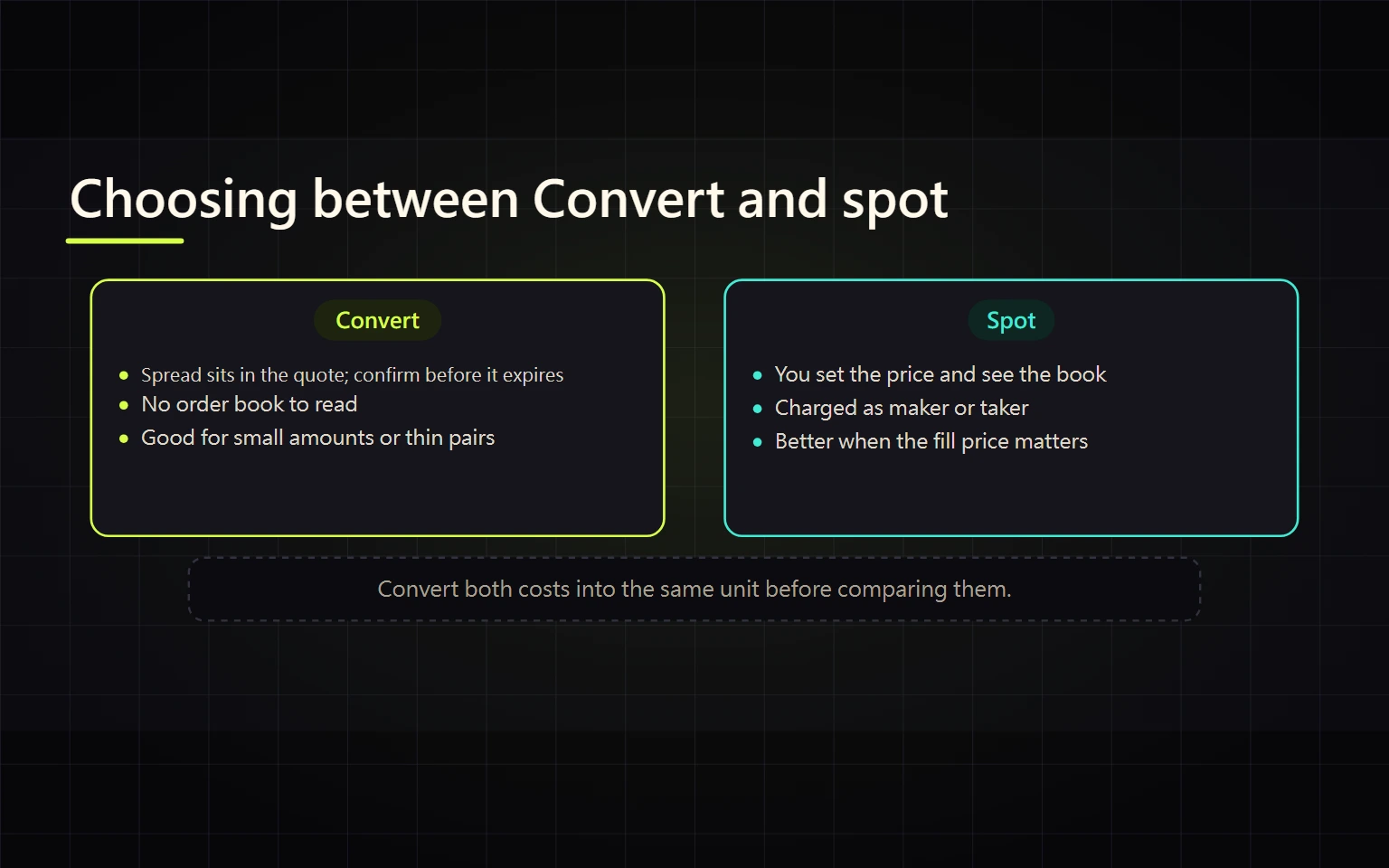
| Need | Convert | Spot |
|---|---|---|
| Swap to another supported asset quickly | Fewer steps; evaluate the all-in quote | Requires a pair and order type |
| Specify an execution price | Depends on the available Convert limit mode | A Spot limit order usually provides direct price control |
| Inspect market depth | Order book is not the main interface | Bid, ask, depth, and recent trades are visible |
| Measure cost | Calculate from amount paid and received | Combine fills, commission, and slippage |
| Larger or less liquid asset | Compare the quote before accepting | Inspect depth and consider order design, while recognizing execution risk |
Write the objective before choosing: immediate completion, execution below a defined level, or transparency into market depth. Simplicity is not a quality score. The decisive question is whether the result can be verified before acceptance.
Understand recurring and limit modes
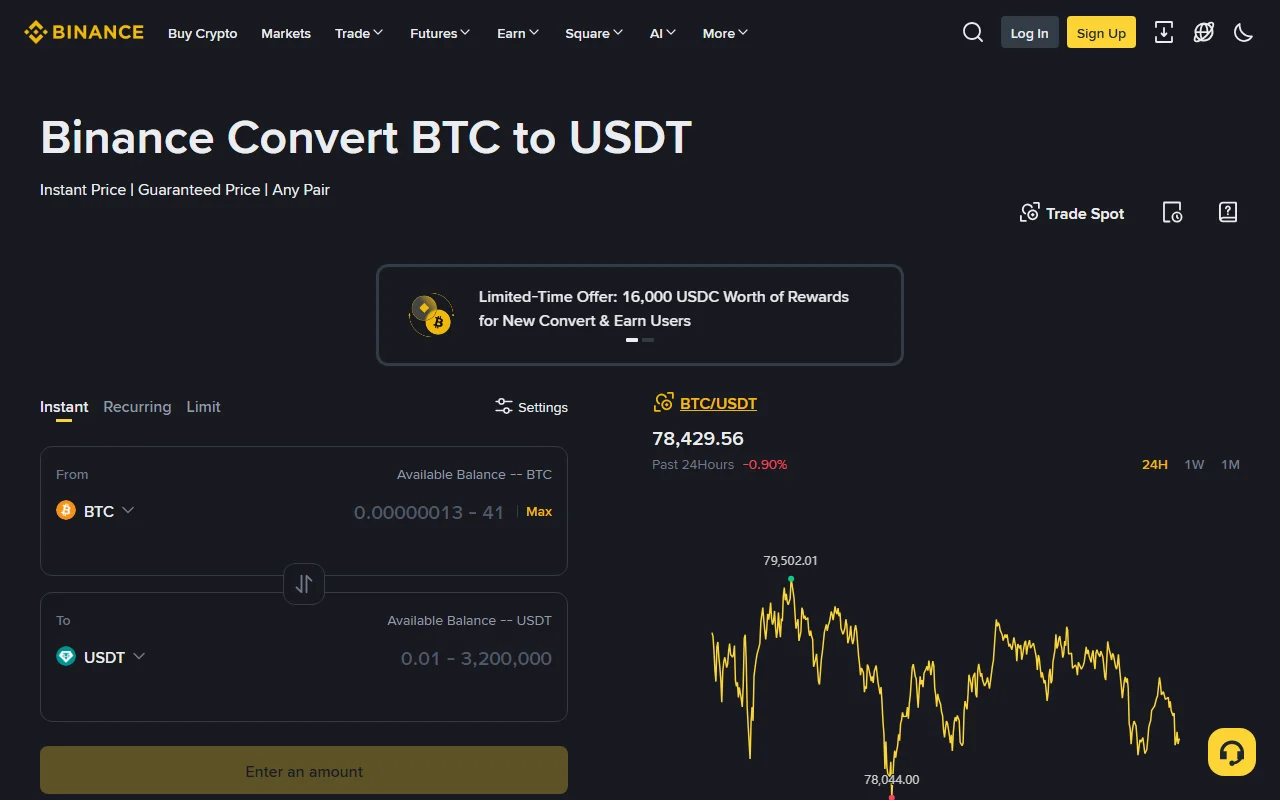
The page may show Instant, Recurring, and Limit, but availability depends on asset, region, and account. A recurring plan repeats on a selected schedule. Before creating one, check frequency, amount, funding source, first execution, pause or cancellation controls, and what happens when funds are unavailable.
A Convert limit mode is a conditional conversion tool. Do not assume it follows the same queue, partial-fill, and maker/taker rules as a Spot order book. Read the live definitions of trigger, expiry, cancellation, locked balance, and receipt. Use Spot when detailed order-book control is required.
Do not create a repeating plan merely to test the interface. The small test in this guide means one Instant conversion.
Verify the completed conversion
A success toast is the first check, not the final check. Confirm all four:
- Convert history contains one unique order with a successful or completed state.
- The actual debit and credit match the last quote you accepted.
- The source balance decreased once and the target asset increased in the expected account.
- Time, direction, quantities, and order number are preserved for cost basis and reconciliation.
If the page reports success but the portfolio estimate looks unchanged, inspect the target asset and the correct account location before submitting another order. Portfolio valuation, price refresh, and asset credit are separate events.
Troubleshoot common failures
Insufficient balance
Confirm that the asset is in a source location supported by Convert, is not locked by another order or product, and the entered amount is within the available balance. A sufficient total portfolio value does not prove the source asset is spendable.
Quote expired or changed
Request a new quote and recalculate the effective rate. Do not demand execution from an old screenshot or click Confirm repeatedly.
Pair or amount unsupported
Check the full asset, direction, minimum, and maximum. A supported bridge asset or Spot pair may offer another path, but every additional conversion requires a fresh cost and risk calculation.
Failed or pending result
Preserve the order number and error message, then inspect Convert history and the asset ledger to determine whether a debit occurred. Do not resubmit while the state is unclear. If there is no definite outcome, provide the order evidence through official Binance Support.
Completed but asset not visible
Check the target ticker, account location, and conversion history. A watchlist, portfolio estimate, or a single Spot-balance view is not the complete account record.
Use official sources and a completion checklist
- Binance Convert interface
- What Is Binance Convert and How to Use It
- Binance Spot Trading Guide
- Binance Convert Terms
Before acceptance: direction is correct, paid and received amounts are read, the quote is live, and the effective rate is acceptable. After acceptance: one order succeeded, one debit occurred, the target asset is credited, and the record is preserved.
Risk notice: crypto prices are volatile, and a successful instant conversion generally cannot be reversed at the original quote. This guide is general education, not investment, legal, or tax advice. Eligibility, limits, quote, and total cost are determined by the live official product at the time of use.