
Trading Basics
Binance Fees Explained: Maker vs Taker, Spread, Slippage, and Withdrawals
Check live maker and taker rates, then calculate commission, spread, slippage, Convert quote cost, and net crypto received after withdrawal.
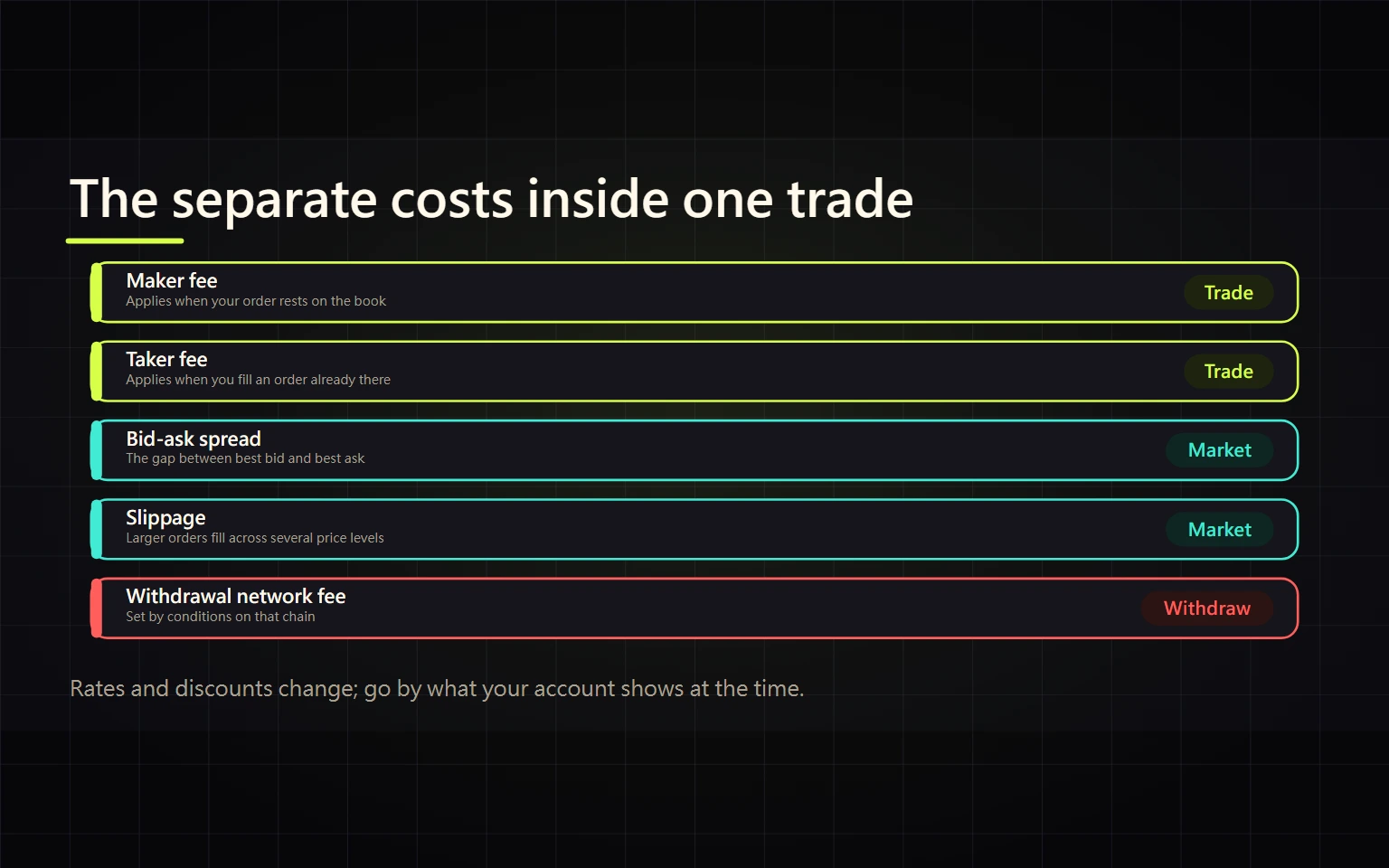
Verified on August 27, 2026. This guide is for beginners preparing for a first Binance spot trade or crypto withdrawal. Rates, discounts, VIP thresholds, promotions, and supported networks can change. Use the live fee page and confirmation screen for your own account. This is general education, not investment, legal, or tax advice.
The cost of a Binance transaction is not just one fee percentage. A spot maker or taker fee, a BNB discount, the bid-ask spread, market-order slippage, a Convert quote, and a blockchain withdrawal fee can all affect what you finally receive. This guide gives you a repeatable way to estimate the total before submitting and reconcile it after completion.
Contents
- Separate the six cost layers
- Find the rate that applies now
- Determine maker or taker status
- Calculate a spot trading fee
- Measure spread, slippage, and Convert quotes
- Calculate withdrawal cost and net receipt
- Use a total-cost worksheet
- Troubleshoot a mismatch
- Completion checklist
- Official sources and verification date
Separate the six cost layers
| Cost | When it appears | Evidence to record | Common mistake |
|---|---|---|---|
| Spot trading fee | When a spot order fills | Commission, commission asset, maker/taker status | Assuming every limit order is maker |
| BNB discount | When enabled and currently eligible | Live schedule and actual BNB deduction | Treating a temporary discount as permanent |
| Bid-ask spread | Whenever best bid and ask differ | Best bid and ask at the same time | Calling a zero-fee route cost-free |
| Slippage | When an order fills away from the reference price | Expected price and average fill price | Calling all price difference a platform fee |
| Convert quote cost | When accepting an instant quote | Input, output, and effective rate | Looking only for a separate fee line |
| Withdrawal fee | When sending crypto to an external address | Fee and estimated net receipt | Choosing a cheap network the receiver does not support |
Only compare like with like: the same asset, direction, time window, input amount, and final destination. Otherwise, a claim that one route is cheaper is not meaningful.
Find the rate that applies now
The official Fees and Transactions Overview publishes a Spot maker and taker schedule, but those figures are time-specific and are not a permanent rate promised to any account.
- Open the Binance Fees and Transactions Overview from a saved official URL.
- Select the correct product, such as Spot & Margin. Do not substitute futures or Web3 Wallet fees for spot fees.
- Find the maker and taker row for your current VIP level.
- Check whether the page separately lists BNB payment, a special stablecoin rate, a zero-fee pair, or a time-limited promotion.
- Recheck the estimate on the order screen, then use the commission and commission asset in Trade History as the final evidence.
The public schedule is useful for planning. Your current account tier, the rule for a specific pair, and the final fill record are what you use for reconciliation. Do not copy a rate from an old video, a search snippet, or another person's VIP screenshot.
Determine maker or taker status
A maker order adds liquidity by resting on the order book instead of filling immediately. A taker order removes existing liquidity by executing against an order already on the book.
- A market order normally executes immediately and is normally a taker.
- A limit order can also be a taker if its price crosses an existing order and fills immediately.
- The portion of a limit order that first rests on the book may be treated as maker when it later fills.
- One order can fill in several pieces at different prices; use the actual fill details and commissions.
- Different fills can even receive different role or promotion treatment. Add the fill records instead of back-calculating the entire order with one assumed rate.
Choosing “Limit” is therefore not proof of maker status. If the relevant interface offers a Post Only option, it can reject an order that would execute immediately, but availability and labels vary by product and interface. Read the live order-screen description before relying on it.
Calculate a spot trading fee
Use these planning formulas:
Trade notional = fill price × filled quantity
Estimated trading fee = trade notional × the currently applicable rate
Illustrative example: Suppose a taker order fills with a 1,000 USDT notional and the confirmation screen shows a 0.100% applicable rate. The estimated fee is 1,000 × 0.001 = 1 USDT equivalent. Only if the same screen confirms an eligible BNB rate of 0.075% would the estimate become 1,000 × 0.00075 = 0.75 USDT equivalent.
Those rates are examples, not a promise. Binance's official explanation says a spot fee can default to the asset received. It may instead be deducted in BNB only when BNB fee payment is enabled, the account is eligible, and sufficient BNB is available. Buy or sell direction and pair rules also affect the result. For reconciliation, record filled quantity, average fill price, commission amount, and commission asset.
For example, if 1,000 USDT buys 0.01 BTC and a 0.1% fee is deducted from the BTC received, commission is 0.01 × 0.001 = 0.00001 BTC and net receipt is 0.00999 BTC. If BNB is insufficient or a promotion is inapplicable, do not insert a discounted fee manually.
Official Binance Academy calculation guide captured August 26, 2026. Insert the live rate for your own account when using the formula.
Measure spread, slippage, and Convert quotes
The spread is the difference between the best ask and best bid at the same moment. A useful reference is the midpoint:
Midpoint = (best bid + best ask) ÷ 2
Buy-side half-spread cost ≈ (actual buy price - midpoint) ÷ midpoint
Slippage is the difference between a pre-trade reference and the actual average fill. For a buy:
Buy slippage = (average fill price - pre-trade reference) ÷ pre-trade reference
Reproducible example: assume the ask side offers 4 units at 100.00 and 6 units at 100.50. A market buy of 10 units spends 4×100 + 6×100.50 = 1,003, for a 100.30 average fill. Relative to the pre-order best ask of 100.00, buy-side slippage is 0.30%. If a 0.1% fee is also deducted from the asset received, net receipt is 9.99 units and the effective unit cost is about 1,003 ÷ 9.99 = 100.4004. Slippage and a separately charged commission are distinct costs and should not be double-counted.
Convert normally presents an input and output quote for a limited acceptance period. To compare Convert with Spot at roughly the same time, record the input asset and amount, output asset and amount, spot reference price, and estimated spot commission. Calculate the Convert effective rate as input amount ÷ output amount, then compare it with the spot average fill plus trading fee. If a quote expires, request a new one; do not use an expired quote to evaluate a later trade.
Calculate withdrawal cost and net receipt
Before withdrawing to an external address, first let the receiving wallet or exchange show its supported asset, network, and Memo/Tag requirement. Return to Binance and choose the exact same network. The confirmation screen normally shows the withdrawal amount, fee, and expected receipt:
Expected receipt = withdrawal amount - displayed withdrawal fee (unless the live screen specifies another method)
If you enter 100 USDT and the screen shows a 1 USDT fee and 99 USDT expected receipt, use 99 USDT as the receiving-side acceptance target. A cheaper network is never acceptable unless the receiving service supports it. For a new address or network, first make the smallest test that the receiving service permits.
Spot trading fees depend on the product and account conditions; crypto withdrawal fees depend on the asset, network, and current platform settings. Keep them separate. If the recipient cannot display the exact same asset and network, stop before submitting.
Use a total-cost worksheet
Compare routes by asking: “How much starting asset must I spend to deliver a specified amount of the target asset to the same destination?”
| Field | Route A | Route B |
|---|---|---|
| Starting input | ||
| Spot or Convert output | ||
| Commission and commission asset | ||
| Spread or slippage versus reference | ||
| Withdrawal fee | ||
| Receiving service or bank fee | ||
| Final amount actually received | ||
| Time to completion |
The lowest displayed cost is not automatically the safest route. Also compare limits, completion time, reversibility, dispute options, and the loss risk of incorrect address or banking data.
Troubleshoot a mismatch
| Problem | Check first | Next action |
|---|---|---|
| Rate differs from public schedule | Product, pair, VIP level, promotion, BNB setting | Open fill details and verify commission asset and amount |
| Limit order charged taker rate | Whether it crossed and filled immediately | Trust fill status; next time check for a suitable Post Only option |
| BNB discount absent | Setting, BNB balance, and pair eligibility | Do not apply a discount manually; reconcile the actual deduction |
| A zero-fee promotion appears | Pair, side, user, and date eligibility | Do not present it as permanent; save the terms and actual fill deduction |
| Market order cost more than expected | Order-book depth, fills, and average price | Separate slippage from commission |
| Convert shows no fee field | Input, output, and contemporaneous spot reference | Calculate the effective rate; refresh an expired quote |
| Withdrawal receipt is lower | Confirmation fee, network, and receiving-side charge | Reconcile expected receipt and TxID; stop if networks do not match |
| Network is suspended or amount is below minimum | Withdrawal-page status and minimum | Do not switch to a chain the recipient cannot accept; wait or use a compatible lawful route |
Do not place a second, larger transaction to diagnose an unexplained result. Save the fee page, order ID, fill details, time, and TxID, hiding account and address data before sharing. Use support only from the Binance app or official website.
Completion checklist
- I am on an official page and selected the correct product and pair.
- I recorded my live maker and taker rate instead of copying the example.
- I understand why the order may be maker or taker.
- I tracked commission, spread, slippage, Convert quote cost, and withdrawal fee separately.
- I can reconcile filled quantity, average price, commission amount, and commission asset.
- For a withdrawal, the recipient supports the exact asset, network, and Memo/Tag.
- I retained a non-sensitive record and the final receipt matches the expected amount.
At that point, you have not merely “looked at the fee.” You can estimate before execution, reconcile after it, and locate the correct evidence when the numbers differ.
Official sources and verification date
Primary sources rechecked August 27, 2026: