
Trading Basics
Binance Market vs Limit Orders: First Trade, Slippage, and Order Status
Compare speed, price boundaries, and non-fill risk, calculate a multi-level market fill, place a small market or limit order, and verify its final state.
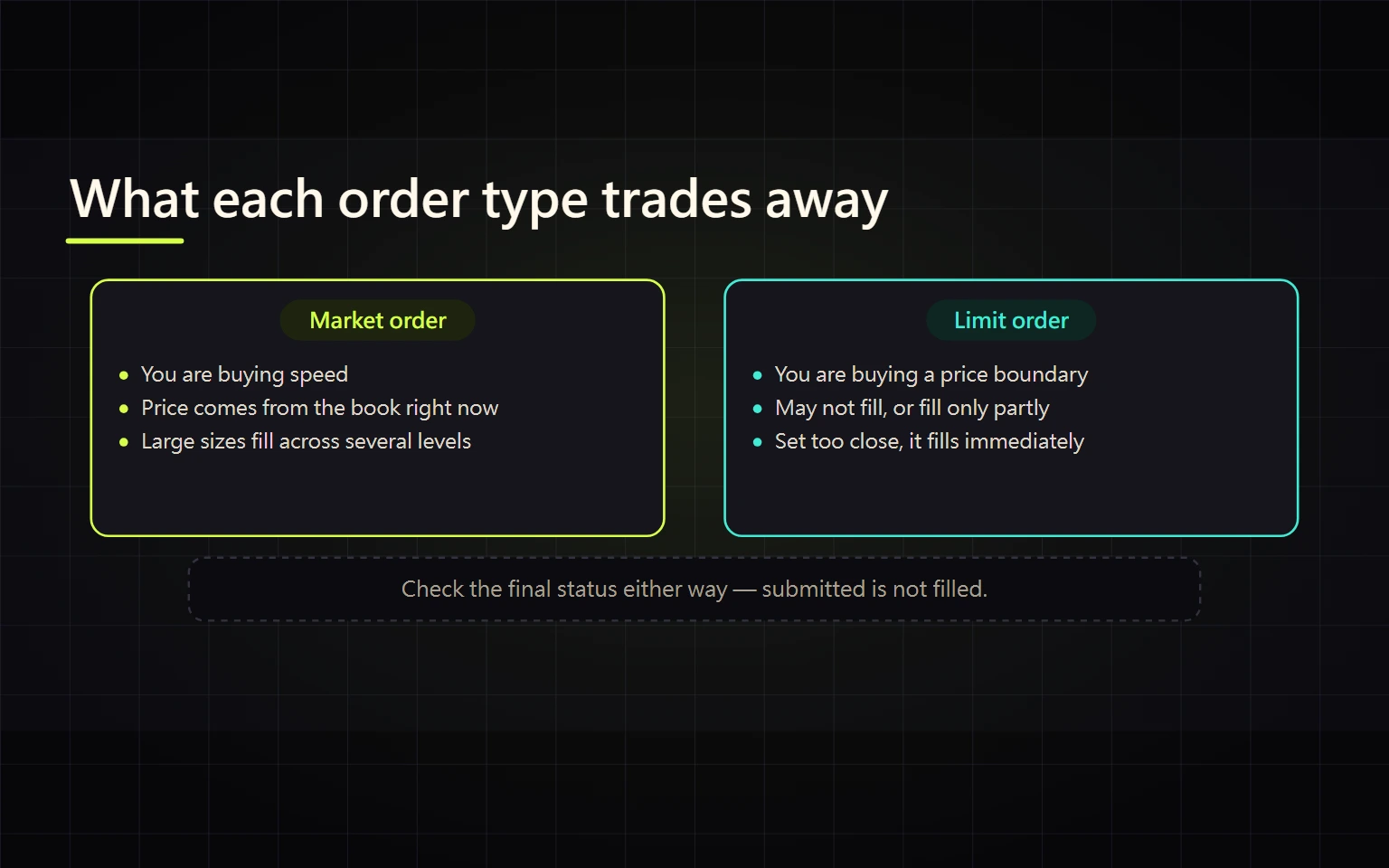
The market-versus-limit decision is not about one order being universally better for beginners. It is a trade-off between execution speed and a price boundary. Both can produce a result that surprises a new user: a market order can consume several price levels, while a limit order can remain unfilled, fill partly, or execute immediately when its price crosses available liquidity.
This guide is for someone who can already locate Binance Spot and is preparing a small first order. By the end, you should be able to select an order by objective, enter the correct direction and unit, calculate a multi-level average fill, and use the final status to wait, cancel, correct, or verify.
Verified on 2026-08-27. Available order types, time-in-force options, tick size, step size, minimum notional, and eligibility vary by pair, account, location, and interface version. Screenshot prices are capture-time data. All numerical examples below are hypothetical teaching calculations, not claimed executions or recommendations.
Contents
- Choose with three questions
- Understand market-order execution and slippage
- Calculate a three-level market fill
- Set a limit buy or limit sell
- Do not equate limit with maker
- Compare GTC IOC and FOK
- Use live trading filters to fix rejections
- Submit and decide by order status
- Complete the order and reconcile cost
- Official sources and stop conditions
Choose with three questions
| Question | Market order | Limit order |
|---|---|---|
| Primary objective | Match available liquidity promptly | Never buy above or sell below a specified boundary |
| Price outcome | No single locked price; several levels can create slippage | Executes only at the limit price or better |
| Non-fill risk | Usually matches quickly where liquidity exists, but actual state still governs | Can remain completely unfilled or fill only partly |
| Common use | Small size, sufficient depth, acceptance of live prices | Explicit boundary and willingness to manage a remainder |
| Main evidence | Average fill, quantity, and commission | Filled quantity, remainder, state, and reserved balance |
Answer three questions before selecting a tab: Must the trade execute now? What is the worst acceptable price? If only part fills, will you wait or cancel? Do not submit first and invent the decision afterward.
Understand market-order execution and slippage
The Spot order panel shows order-book depth alongside the Limit and Market tabs. Prices and depth change continuously.
A market buy starts from the lowest available ask; a market sell starts from the highest available bid. When the first level is too small, the remainder matches later levels. The last-traded price is not locked, and verification must use the weighted average fill.
Thin depth, rapid volatility, or an order that is large relative to available liquidity can increase slippage. Visible depth may change before submission, so an estimate is not a guarantee. Market orders prioritize rapid matching, but the actual result is still established by FILLED, PARTIALLY_FILLED, EXPIRED, or another reported status. Avoid an unconditional promise of a complete fill.
A market-buy form may accept quote-asset spending, such as how much USDT to spend. A market sell commonly accepts base-asset quantity, such as how much BTC to sell. Interfaces change; read the unit beside the live input rather than assuming the same field on both sides.
Calculate a three-level market fill
Assume this ask book solely for the calculation:
| Ask price | Available quantity |
|---|---|
| 100.00 | 2 units |
| 100.20 | 3 units |
| 100.50 | 5 units |
A market buy of 6 units consumes 2×100.00, 3×100.20, and 1×100.50. Total spending is 601.10, so the weighted average is 601.10÷6, or about 100.1833. Relative to the initial 100.00 ask, the average is about 0.1833% higher.
Commission is not yet included. If commission is deducted from the asset received, the net receipt is below 6. If another asset pays it, convert that cost to the same quote unit. The fees, spread, and slippage guide provides the full reconciliation.
Set a limit buy or limit sell
A limit buy sets the highest price the buyer accepts. A limit sell sets the lowest price the seller accepts.
Assume the current lowest ask is 100:
- A limit buy at 98 cannot execute above 98. If the market never reaches it, the order can remain open.
- A limit buy at 101 crosses the existing ask and can execute immediately at 100 or a better available price; it does not wait to pay 101.
- A limit sell at 103 cannot execute below 103. It may wait, partially fill, or never fill.
A price boundary is not an execution guarantee. Even if a chart touched the limit, available quantity, queue position, and fast movement may prevent a complete fill. Verify filled and remaining quantity rather than relying on the chart line.
Do not equate limit with maker
A maker leaves liquidity on the book; a taker matches existing liquidity immediately. A regular limit order can begin as maker when it rests. A limit buy at or above an available ask, or a limit sell at or below an available bid, can match immediately and be a taker.
Only a Limit Maker or Post Only control, when available and valid, is designed to prevent immediate matching. If the order would cross, that specialized order is generally rejected instead of silently becoming a regular taker. Names and availability differ, so use the live definition.
Maker and taker can have different rates, but the order label is not evidence of the final role. Inspect fill details, commission amount, and commission asset. One order split into multiple fills can contain separate execution records.
Compare GTC IOC and FOK
A limit order may expose Time in Force:
- GTC, Good Til Canceled: the unfilled quantity remains open until it fills or is canceled. It is the option most likely to create a forgotten remainder and reserved balance.
- IOC, Immediate Or Cancel: fills the immediately available portion and cancels the rest.
- FOK, Fill Or Kill: must fill completely and immediately, or it is canceled in full.
Do not assume every pair, device, or order type presents the same controls. If the first interface shows only a standard limit order, read its live default and inspect Open Orders immediately after creation.
Use live trading filters to fix rejections
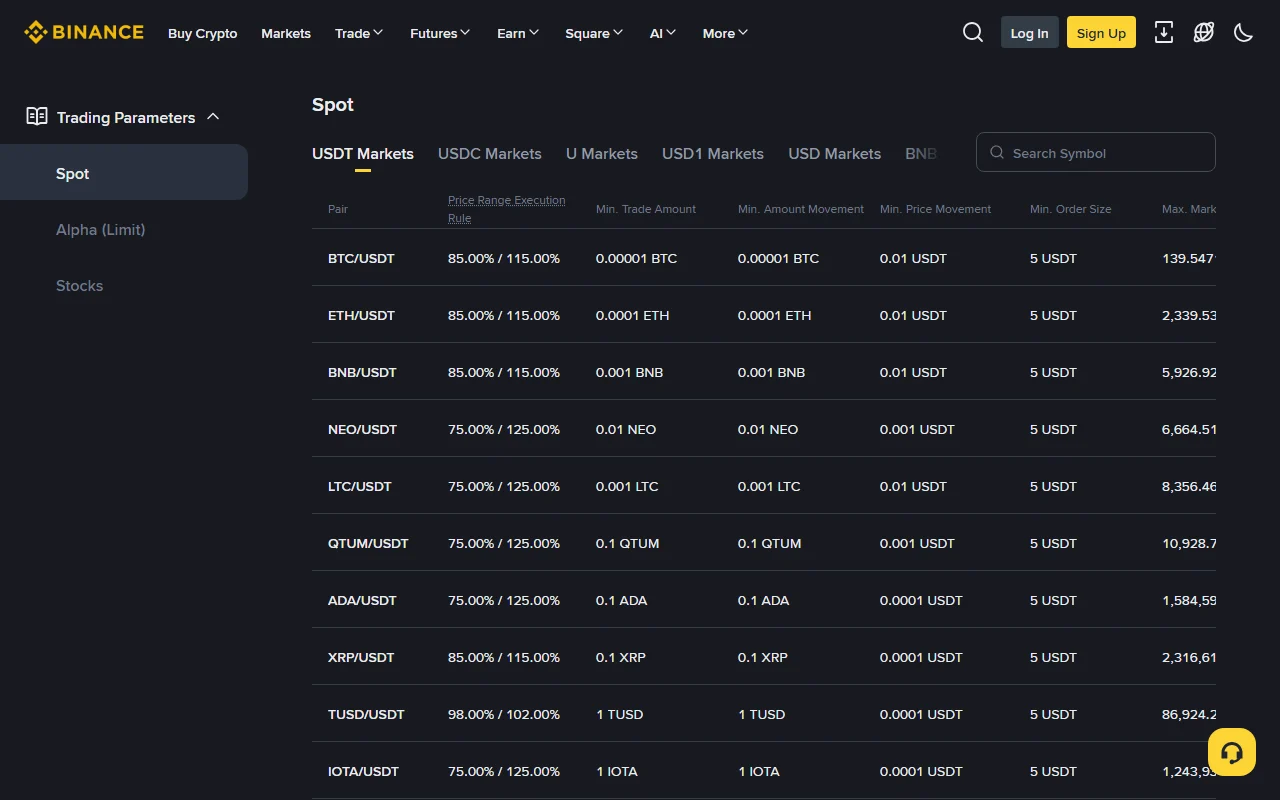
The public parameters page exposes current restrictions for each pair. Common rules include:
- PRICE_FILTER or tick size: permitted price increments;
- LOT_SIZE or step size: permitted quantity increments;
- MIN_NOTIONAL or NOTIONAL: permitted price-times-quantity range;
- MARKET_LOT_SIZE: quantity constraints for market orders;
- pair status, execution range, and account eligibility.
REJECTED does not automatically mean a platform outage. Read the original message, then check available balance, complete pair, direction, input unit, minimum notional, price and quantity precision, and pair status in that order. Correct the identified field and create one new order; do not repeatedly submit the same invalid request.
Numbers visible in the screenshot reflect the capture time and must not be copied as permanent minimums.
Submit and decide by order status
Before submission, check Spot, complete pair, Buy or Sell, input unit, available balance, price boundary, estimated quantity, live filters, and commission. Use an amount that cannot affect essential finances.
After submission:
- REJECTED: no valid order was accepted. Correct balance, filter, permission, or pair-status evidence before trying again.
- NEW or Open: accepted but not fully filled. Explicitly wait or cancel.
- PARTIALLY_FILLED: an executed portion cannot be reversed. Wait for or cancel only the remainder; do not repeat the original full amount.
- FILLED: inspect Trade History for actual quantity, weighted average, commission, and commission asset.
- CANCELED, EXPIRED, or EXPIRED_IN_MATCH: determine whether a partial fill exists before creating an order only for the real shortfall.
Cancel affects only the unfilled remainder. CANCELED does not prove that nothing executed; Order History and Trade History must be read together.
Calculate a replacement after a partial fill
Assume the original objective was to buy 6 units. A limit order executed 2.5 units and left 3.5 units Open. After canceling the remainder:
| Field | Quantity | Interpretation |
|---|---|---|
| Original objective | 6 | This is the total target, not a quantity to copy into a replacement |
| Already executed | 2.5 | This trade cannot be reversed and counts toward the target |
| Canceled unfilled remainder | 3.5 | Cancellation releases only this part; it does not erase the 2.5 fill |
| Maximum replacement shortfall | 6 - 2.5 = 3.5 |
Replace only 3.5; resubmitting 6 and filling it would produce 8.5 total units |
Use remaining objective = original target - all executed quantity. A commission deducted from the received base asset changes the net wallet receipt, but it does not turn executed quantity back into unfilled quantity. Reconcile commission and net holdings separately.
Complete the order and reconcile cost
The exercise is complete only when all are true:
- You can explain the Market or Limit choice and the accepted price or non-fill risk.
- Final status and actual executed quantity are known.
- No unintended Open Order or forgotten reserved balance remains.
- For a fill, average price, quantity, commission, and commission asset are recorded.
- Base and quote balance changes reconcile to the fill history.
- Any replacement order covers only the actual shortfall, not the original amount again.
If the interface itself is unclear, return to the Binance Spot interface guide. After a fill, calculate effective unit cost with the fees and slippage guide rather than using one headline price.
Official sources and stop conditions
- Binance Academy: What Is a Market Order?
- Binance Academy: What Is a Limit Order?
- Binance Academy: Makers and Takers
- Binance Spot Trading Parameters
- Binance Spot API trading rules and order states
Stop if Spot, the complete pair, direction, or input unit cannot be confirmed; if status is unknown but another order is about to be sent; or if a price or quantity rejection has not been explained. This guide is general education, not investment, legal, or tax advice. No order type guarantees profit or prevents loss.