
Deposits & Withdrawals
How to Deposit Crypto to Binance: Network, Address, Memo, and Recovery
Deposit crypto to Binance by checking the asset, network, address, Memo, minimum, and TXID, then follow the right recovery path if it is not credited.
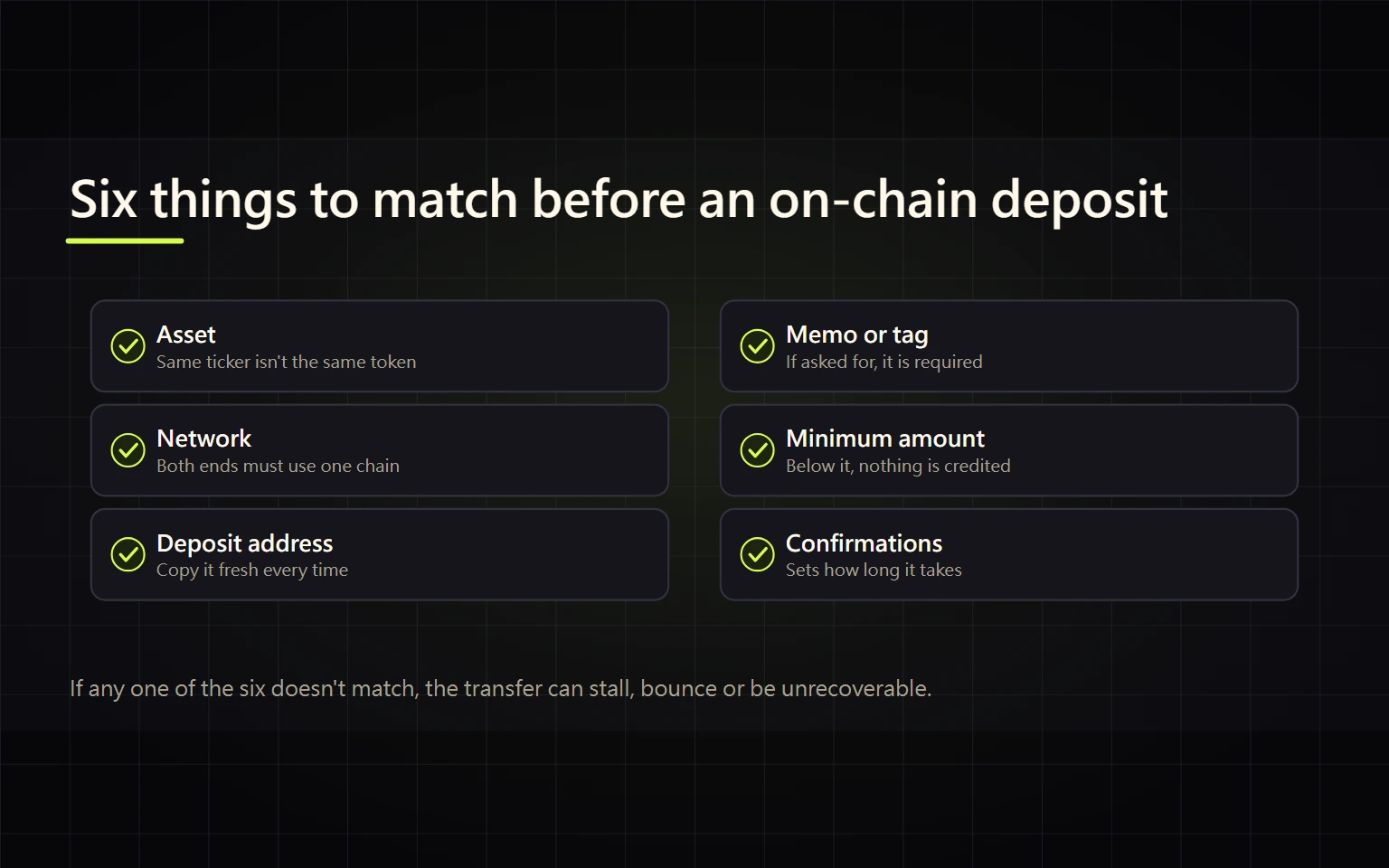
A crypto deposit to Binance is not just an address paste. The transfer only has a valid path when the asset, blockchain network, deposit address, Memo or Tag, minimum amount, and live deposit status all agree. A mismatch can cause a delay, a paid recovery process, a return to the sender, or permanent loss.
This guide is for a first transfer from a self-custody wallet or another exchange, and for anyone troubleshooting a transfer that the sender labels complete but Binance has not credited. By the end, you should be able to complete a small test deposit, use the TXID to identify the current stage, and choose the correct official recovery path.
Verified on 2026-08-26. Supported assets, networks, minimums, confirmation requirements, suspension status, and recovery eligibility can change. Treat the live Binance deposit page, the Deposit & Withdrawal Status page, and the sending platform as the sources of truth at the time of transfer.
Contents
- Confirm that this is an on-chain deposit
- Check six fields before sending
- Complete the deposit step by step
- Choose the correct network
- Know when a Memo or Tag is required
- Track the deposit with a TXID
- Troubleshoot a deposit that is not credited
- Separate wrong-network and missing-Memo recovery
- Verify completion and preserve evidence
- Use official sources and stop unsafe actions
Confirm that this is an on-chain deposit
An internal Binance transfer moves an asset between locations such as Funding and Spot inside the same account. It normally does not create a public blockchain TXID. A transfer from another exchange or a self-custody wallet to a Binance deposit address is an on-chain deposit, which is the process covered here.
Before opening a withdrawal form at the sender, answer three questions: Where is the asset now? Which networks can the sender actually use? Which networks does Binance currently accept for the same asset? There is a usable route only when both sides support the same network.
The public Binance status page reports status at the asset level. An asset-level Normal label does not prove that every network is available. Expand the asset and compare the specific network with the live deposit page before sending.
Stop if: there is no network supported by both sides, deposits are suspended, the ticker matches but the full asset or contract does not, or the sender cannot identify the network it will use. Do not send first and ask support afterward.
Check six fields before sending
| Field | Where to verify it | Common failure |
|---|---|---|
| Asset | Binance deposit page and sender asset page | Trusting a ticker while ignoring the full name or token contract |
| Network | Network selectors at both ends | Treating ERC20, BEP20, TRC20, or another route as interchangeable |
| Address | Address generated by Binance for that asset and network | Reusing an old screenshot or an address supplied in a support message |
| Memo or Tag | Binance deposit page | Copying the address but omitting the account identifier |
| Amount | Minimum deposit, sender fee, and expected receipt | Letting fees reduce a test below the minimum |
| Status | Live network status and confirmation requirement | Copying a fixed confirmation count from an old tutorial |
A similar-looking address format does not prove network compatibility. Return to the current Binance deposit page for every transfer instead of treating the previous address and Memo as a permanent template.
Complete the deposit step by step
- Enter Binance through the official website or app and open
Deposit → Deposit Crypto. - Select the complete asset name. Do not rely on the ticker alone.
- Review the networks offered by Binance, then confirm that the sending wallet or exchange can withdraw on exactly the same network.
- Read the minimum deposit, suspension notice, and current confirmations required for crediting or unlocking.
- Copy the deposit address. If the page also shows a Memo, Tag, or Payment ID, copy that identifier as well.
- At the sender, verify the asset, network, full destination address, Memo or Tag, amount, network fee, and expected receipt.
- For a new route, consider a small test that remains above the current minimum after fees and is economically sensible.
- Submit once. Save the TXID and inspect it in a block explorer for the selected network.
- Return to Binance deposit history and verify the record, credited balance, and availability state. Do not rely only on the portfolio valuation.
Compare the pasted address in full sections. Clipboard malware can replace an address after copying. Do not check only two or three characters at each end, and do not scan a QR code sent by an unverified person.
Choose the correct network
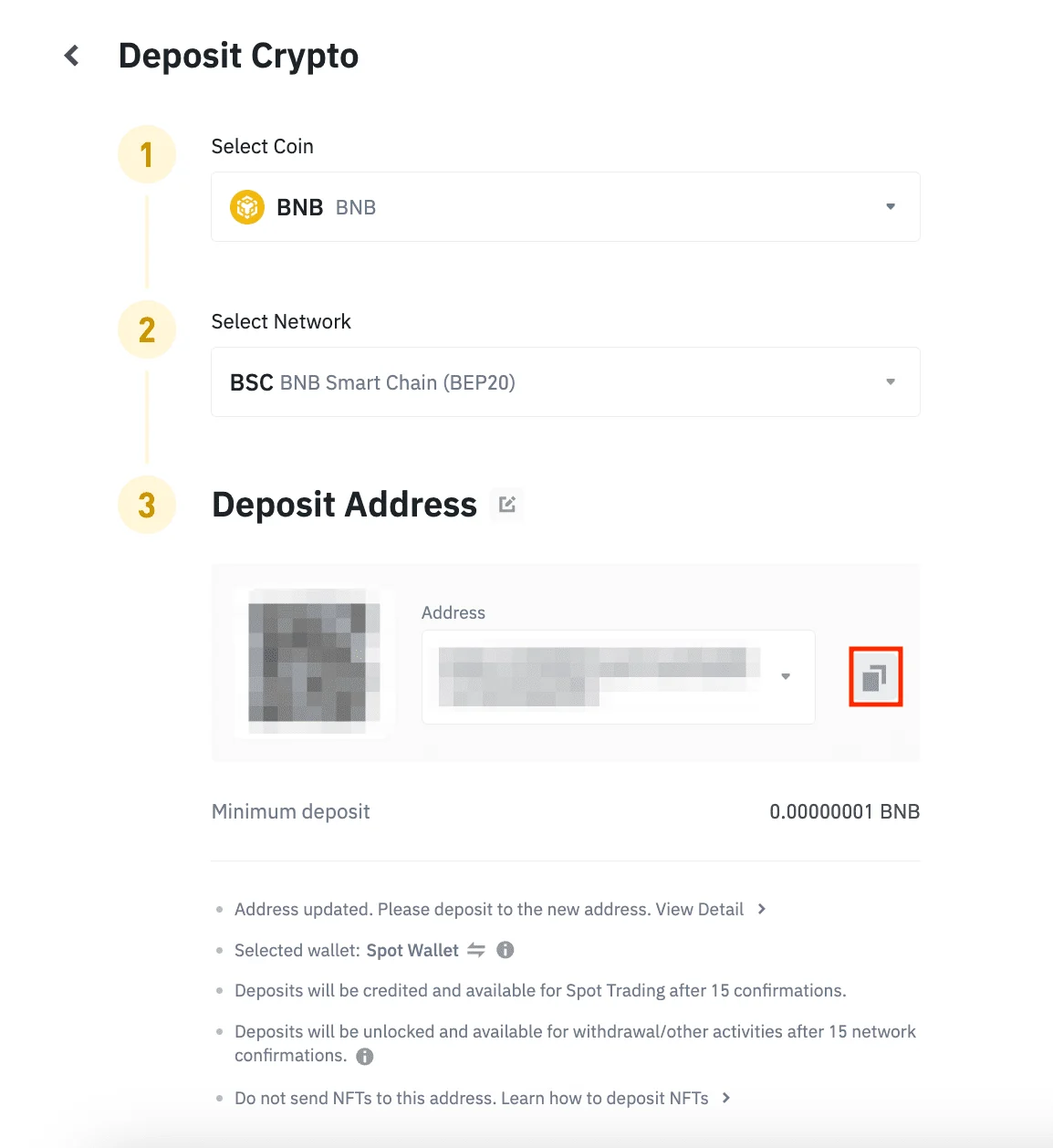
Source: the official Binance “How to Deposit Crypto” guide. Binance redacted the example address and QR code. BNB, BSC, the minimum, and confirmation counts belong only to this example; read the live signed-in page before every transfer.
The lowest fee is not the first selection criterion. Use this order:
- both sender and Binance support the network;
- the asset and token contract are correct;
- Binance currently has deposits open on that network;
- you can provide the required address and Memo accurately;
- only then compare cost and expected speed.
USDT, for example, can exist on several blockchains. Choosing a network does not bridge USDT from a different blockchain. If two platforms use different labels, compare their official network details or chain ID rather than guessing from a community answer.
A self-custody wallet may also need the network's native asset to pay gas. When the sender is another centralized exchange, use the withdrawal network and fee shown by that exchange at submission time.
Know when a Memo or Tag is required
A Memo, Tag, or Payment ID can identify an individual Binance account when a network uses a shared deposit address. It is required only when the Binance deposit page shows the field, but when shown it is as important as the address.
Do not translate, shorten, or add spaces to the value. If the sending platform has only a generic notes field, confirm that it is the correct place for Binance's Memo or Tag before proceeding.
If the transfer was already sent with a missing or wrong identifier, do not send a second deposit to “correct” it. Preserve the TXID, asset, network, amount, sending address, and the value that was entered. Use Binance's dedicated wrong or missing Tag/Memo recovery process. Eligibility, return destination, and any fee are determined by the live application; recovery is not guaranteed.
Track the deposit with a TXID
A transaction ID, transaction hash, or TXID is the public identifier for an on-chain transaction. It can show whether the transfer was broadcast, the network used, destination address, amount, and confirmation state. It does not prove that Binance has completed its internal crediting step.
Check in this order:
- The sender produced a unique TXID. An internal withdrawal order number alone is not an on-chain reference.
- The TXID appears in the explorer for the selected network and is not failed, dropped, or replaced.
- The destination address, token contract, and amount match the intended deposit.
- The current confirmations meet the live requirement shown by Binance.
- The corresponding entry appears in Binance deposit history.
Block explorers are public. A TXID is normally useful evidence for support, but never combine it in a public post with your email, phone, UID, 2FA data, cookies, API secret, or device details.
Troubleshoot a deposit that is not credited
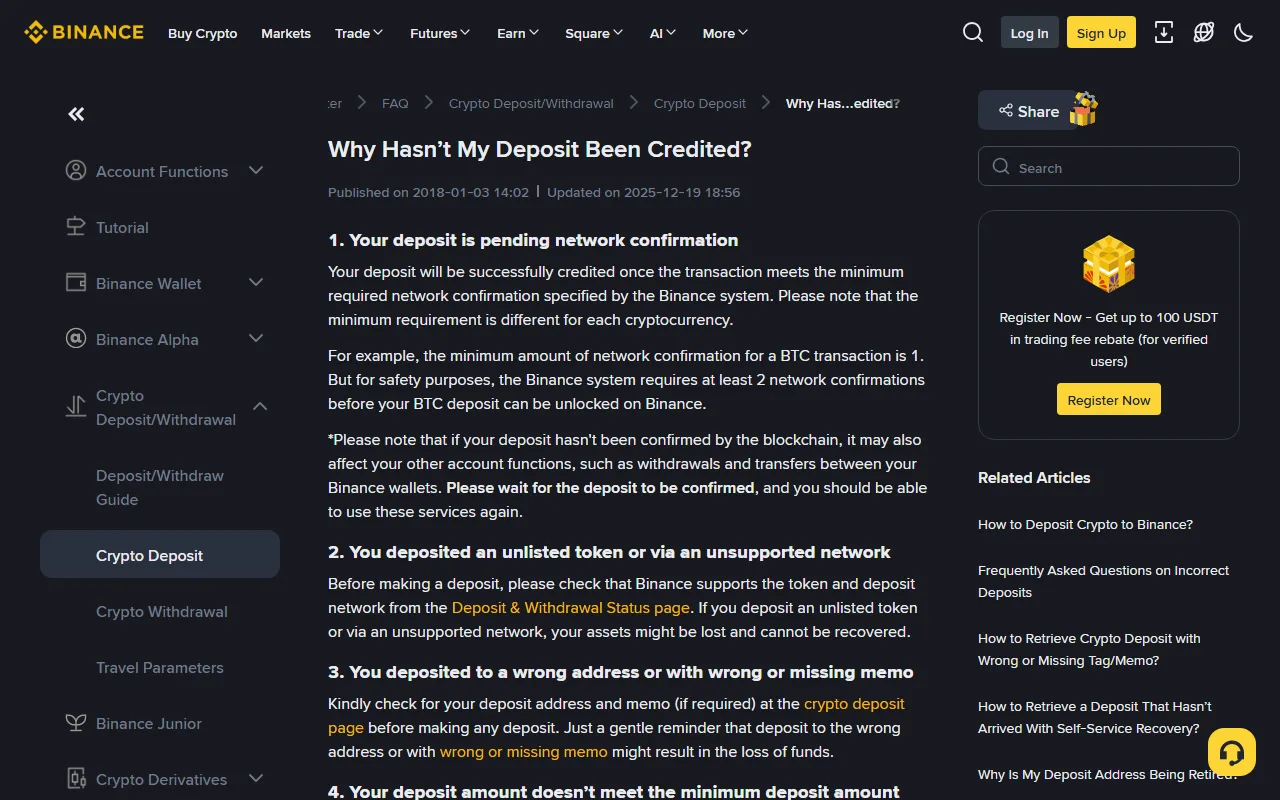
The official page above separates several states. Do the same instead of calling every delay “network congestion.”
No TXID or a failed on-chain transaction
The issue remains at the sender. Check its withdrawal record and error message. Do not file a Binance claim for a successful on-chain deposit when no successful transaction exists.
Successful transaction with insufficient confirmations
Continue monitoring the correct explorer. Confirmation requirements vary by asset and network and can change, so use the live Binance deposit page instead of a number copied from an older article.
Successful transaction with correct data but no Binance credit
Prepare the TXID, asset, network, amount, sending address, and time. Use the official self-service recovery for an uncredited deposit or Binance Support. Do not hand account data to a person claiming to be support on Telegram, WhatsApp, or social media.
Amount below minimum or deposits suspended
Read the live asset deposit page and status page. A second transfer may not automatically merge with an amount below the minimum. A suspension also does not by itself mean the asset has vanished. Follow the option shown by the official page.
Separate wrong-network and missing-Memo recovery
These errors do not share one generic “contact support” workflow.
Wrong network or unsupported token
Use the TXID to identify the actual blockchain and destination address. If the address does not belong to Binance, contact the owner or receiving platform; Binance cannot control that address. If the address belongs to Binance but the network or token is unsupported, read the Incorrect Deposits FAQ and use Retrieve Now only if the live page offers it. The absence of an automated entry does not create a guaranteed manual recovery.
Wrong or missing Memo or Tag
Use the dedicated Tag/Memo recovery application and provide only the information requested on the official domain. Binance states that some cases may be ineligible, including situations where the incorrect Memo belongs to another user. An eligible case may still involve a fee or a return to the original sending address.
Never take these actions
- Never reveal a private key, seed phrase, password, 2FA code, or remote-control access.
- Never pay an “unlock fee,” extra gas payment, or guarantee deposit requested in a private message.
- Never repeat a transfer while the original state is unclear.
- Never use a success screenshot as a substitute for the TXID and official history.
Verify completion and preserve evidence
Treat an on-chain deposit as complete only when all relevant checks pass:
- the sender provides a unique, searchable TXID;
- the blockchain shows success and the network, destination, asset, and amount match;
- Binance deposit history contains the corresponding record;
- the balance is credited to the expected account location;
- if Binance distinguishes credited from unlocked, the live requirement has been met before trading or withdrawing;
- the TXID, time, amount, network, and platform records are preserved for reconciliation and possible tax reporting.
Even after a successful test, do not save the address as a template that no longer requires review. On the next transfer, confirm that Binance has not retired the address, suspended the network, or changed the minimum.
Use official sources and stop unsafe actions
- How to Deposit Crypto to Binance
- Binance Deposit & Withdrawal Status
- Why Hasn't My Deposit Been Credited?
- Wrong or Missing Tag/Memo Recovery
- Incorrect Deposits FAQ
- How to Find a TXID
Risk notice: on-chain transfers are generally irreversible, and recovery may be unavailable or unsuccessful. This guide is general educational information, not investment, legal, or tax advice. Use the official page and rules for your location at the time of action.