
Deposits & Withdrawals
Binance P2P Guide: Buy and Sell USDT Safely, Release, and Appeal
Filter ads, verify a counterparty, pay or confirm receipt, release crypto safely, and use the Binance P2P appeal path when order evidence does not match.
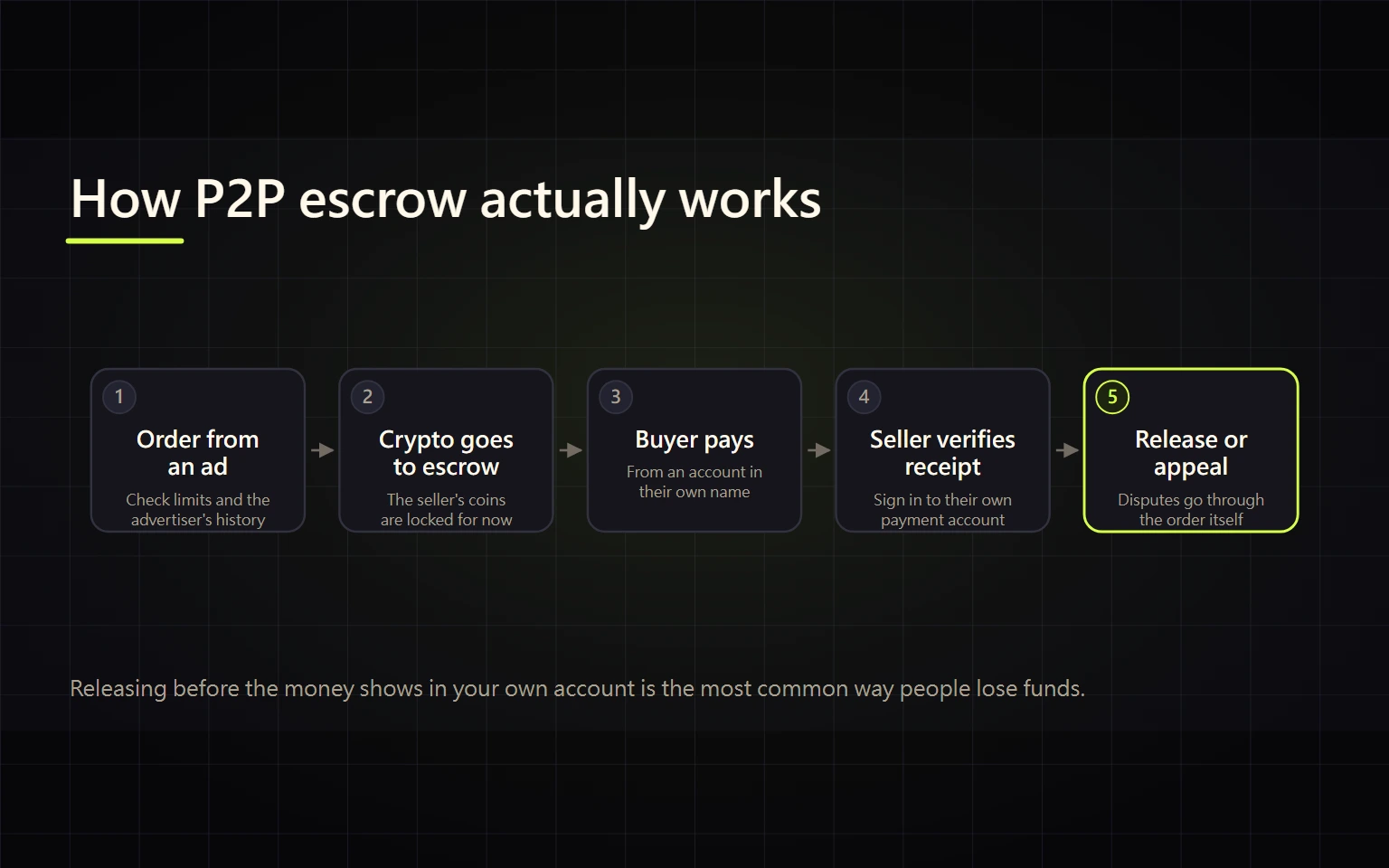
Binance P2P lets users buy or sell crypto directly with another user under the terms of an advertisement. The Binance order and escrow flow can reduce settlement risk, but it cannot replace your own verification of payment, payer identity, ad terms, or an attempt to move the trade outside the platform.
This guide is for a first USDT purchase or sale. By the end, you should be able to select an executable ad, complete the payment or receipt checks, know exactly when crypto may be released, and stop or appeal when the evidence does not match the order.
Verified on 2026-08-27. Available assets, fiat currencies, payment methods, limits, counterparty metrics, and appeal controls vary by location and account. Treat the signed-in order page, the selected ad, and current Binance rules as the sources of truth. No advertiser or quote shown in a screenshot is endorsed here.
Contents
- Decide whether P2P fits the transaction
- Check six fields before creating an order
- Filter ads and assess a counterparty
- Buy USDT step by step
- Sell USDT step by step
- Handle payment cancellation and third-party payment
- Appeal with usable evidence
- Calculate the effective price
- Verify completion and preserve records
- Use official sources and stop unsafe actions
Decide whether P2P fits the transaction
P2P can match a fiat currency, amount, and payment method to an individual advertiser. In return, you must read that advertiser's terms, act within the order timer, and independently confirm the real state of a bank or payment account. P2P is not a fiat transfer to Binance, and the platform does not make every external payment method irreversible.
Before starting, confirm that the product is available in your location, your account satisfies the live verification requirements, the payment account belongs to you and complies with the name rule shown in the order, and you can sign in to the payment service to inspect its transaction details. Compare P2P with the routes in the fiat funding guide instead of selecting it solely because one quote looks attractive.
Stop if: the product is unavailable, the payment account is not yours, you cannot understand the ad terms, a counterparty requests an off-platform settlement, or you cannot independently inspect the sending or receiving account.
Check six fields before creating an order
| Field | What must be explicit | What is not enough |
|---|---|---|
| Direction | Buy means pay fiat and receive USDT; Sell means receive fiat and release USDT | Button color or a chat message |
| Asset and fiat | Full asset, fiat code, and order amount | Seeing USDT without checking fiat |
| Order limit | Your amount fits the ad minimum and maximum | Total inventory shown by the advertiser |
| Payment method | You own it, can use it, and can inspect it live | Choosing only by speed or advertised cost |
| Counterparty | Order history, completion rate, typical time, and verification indicators | One metric or a display name |
| Terms | Name, bank, reference, timing, and evidence requirements | Headline price alone |
If one field does not fit your real situation, select a different ad. Do not ask the counterparty to replace the account, amount, or settlement conditions after the order starts.
Filter ads and assess a counterparty
The public P2P market lists advertiser history, completion rate, price, limits, and payment methods, and every one of those changes continuously. Use this sequence:
- Select Buy or Sell, then the crypto asset and fiat currency.
- Enter the actual transaction amount so ads outside the limits disappear.
- Filter for a payment method you personally control.
- Open the complete ad terms and check name, bank, reference, and time conditions.
- Consider completion rate, completed orders, typical settlement time, and verification indicators together.
- Compare the net payment or receipt across at least three eligible ads rather than automatically taking the first row.
A high completion rate is not a guarantee, and a large order count does not make an ad compatible with your bank. When a quote is far away from nearby ads, inspect the limits, method, and terms before treating the difference as an opportunity.
Buy USDT step by step
- Open P2P, choose Buy, and set USDT, fiat, amount, and payment method.
- Read the entire ad. Confirm that recipient details come from the live Binance order only.
- After creating the order, check the exact amount, deadline, recipient name, and order number again.
- Send the exact amount from your own compliant payment account. Do not put crypto-related text in a payment reference unless the order explicitly requires it.
- Mark the order as paid only after the bank or payment service shows that you actually submitted the transfer.
- Save the payment transaction reference, time, amount, and recipient. Keep all communication in order chat.
- Wait for release. Do not cancel a paid order because the counterparty asks, and do not send a second payment to a new account.
- When the order is Complete, verify that USDT is credited to the expected account, commonly Funding, before making an internal transfer or trade.
Use the order status for three checkpoints
| Checkpoint | What the live order must show | External evidence to preserve |
|---|---|---|
| Buyer has sent payment | Use the live “Transferred / Notify Seller” or equivalent control only after the transfer was actually submitted | Successful provider status, transaction reference, time, amount, and recipient |
| Seller is ready to release | Independently verify usable receipt plus matching payer, amount, and currency before confirming receipt and release inside the order | Transaction detail obtained by signing in yourself; a counterparty screenshot is not a substitute |
| Both sides have settled | The order explicitly reaches Complete; the buyer separately verifies the USDT credit and the seller verifies that fiat remains available | Order number, final status, asset record, and bank reconciliation |
If the order enters Appeal, do not treat Paid, Releasing, or a chat promise as completion. Keep the asset inside the order flow and submit evidence that preserves the time, amount, and link to the transaction. Labels vary by language, device, and region, so the signed-in order is authoritative; the public-market screenshots in this guide cannot prove an individual order state.
If the transfer failed or was never submitted, do not mark it paid. If funds were debited but the order still looks unpaid, preserve the bank evidence and use the order flow instead of sending again.
Sell USDT step by step
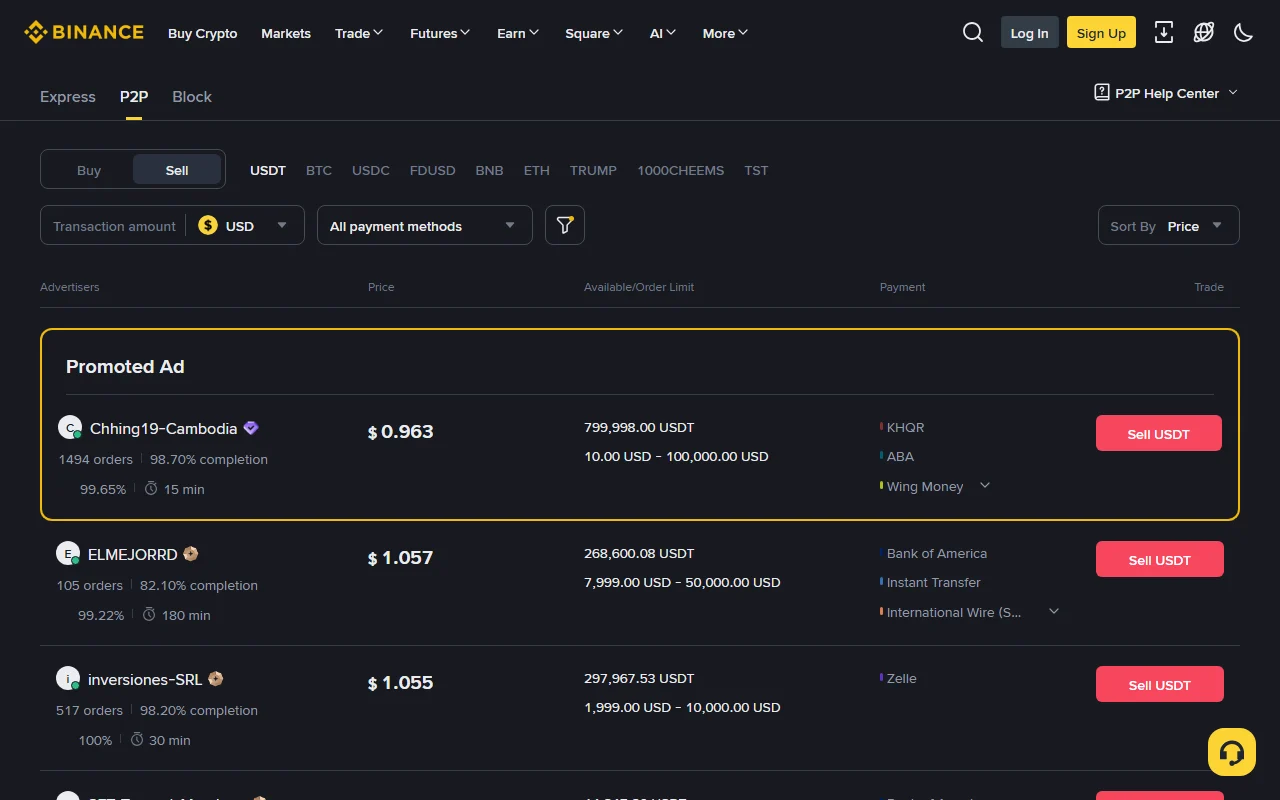
- Confirm that USDT is in the account location required by the P2P page. Choose Sell, fiat, amount, and payment method.
- Read the buyer's history indicators, ad terms, and payment window. Confirm that you can inspect the receiving account live.
- Keep communication inside the Binance order. Do not accept a last-minute payer or payment-channel substitution.
- After the buyer marks paid, sign in to the bank or payment account yourself and inspect the available balance and transaction record.
- Match the received amount, payer name, time, and order terms. An SMS, email, chat screenshot, or transfer image supplied by the buyer is not proof of receipt.
- Release USDT only when every field matches and the funds are available. Complete any security verification on the order page.
- Confirm that the order reaches Complete and preserve both the order and receipt records.
If the buyer marks paid but no usable receipt exists, do not release, refund to a different account, or cancel the order. Reply in order chat and appeal within the live workflow. Stop in the same way when the payer name or amount does not match.
Handle payment cancellation and third-party payment
| Situation | Correct response | Unsafe response |
|---|---|---|
| Buyer has not paid | Follow the order state and terms to cancel if appropriate | Marking paid to extend the timer |
| Buyer has paid | Preserve evidence and wait or appeal in the order | Cancelling and asking for off-platform release |
| Seller sees no receipt | Check available balance and transaction detail; keep crypto in escrow | Releasing because of a screenshot or pressure |
| Payer name differs | Stop release and use help from the order | Refunding to another account named in chat |
| Amount is high or low | Keep the order unchanged and use the official resolution path | Privately topping up, splitting, or refunding |
| Off-platform contact requested | Decline and preserve the message | Moving to Telegram, WhatsApp, or screen sharing |
A third-party payment can indicate a name mismatch, mistaken transfer, or triangulation scam. Even if money temporarily appears, do not invent your own resolution. Follow the order's official instructions and appeal result.
Appeal with usable evidence
An appeal is appropriate when a buyer has genuinely paid but the seller has not released; a seller has no receipt but is being pushed to release; payment details do not match the order; the payer name, amount, or status is abnormal; or the counterparty requests cancellation, off-platform settlement, or security information.
Prepare the order number, in-platform chat, bank transaction reference, payment or receipt time, amount, payer and recipient names, and the payment service's actual status. Redact unrelated account numbers, full card details, balances, and personal information, but preserve the time and amount that connect the evidence to the order.
Start the appeal from that order, choose the accurate reason, and upload the requested evidence. While it is active, do not pay again, release, privately refund, or trust a social account claiming to be support. Binance support does not need your password, 2FA code, seed phrase, or remote-control access.
Calculate the effective price
For a purchase, effective unit price = total fiat paid ÷ USDT received. For a sale, effective unit price = fiat finally available ÷ USDT released. Add any fee imposed by the bank, wallet, or payment service before comparing ads.
Hypothetical example: paying 10,050 fiat units and receiving 10,000 USDT produces an effective price of 1.005. If the payment provider charges another 20, total cost becomes 10,070 and the effective price is 1.007. These are illustrative numbers, not a market quote. They show why a zero platform-fee label does not establish zero spread or zero external cost.
For a cash-out decision, compare the net bank receipt and responsibilities with the direct fiat withdrawal versus P2P guide.
Verify completion and preserve records
A buy is complete only when the bank transfer has a searchable reference, the Binance order is Complete, and USDT appears in the expected account. A sell is complete only when the external payment is available, payer and amount meet the terms, the crypto is released through the order, and the order is Complete.
Preserve the order number, time, fiat amount, crypto quantity, payment method, and reconciliation evidence. If a payment is later reversed, frozen, or disputed, do not create a private arrangement with the counterparty. Preserve the new evidence and use Binance Support and the payment provider's formal dispute channel.
Use official sources and stop unsafe actions
- Binance P2P public market
- What Is Binance P2P and How to Use It
- How to Stay Safe in Peer-to-Peer Trading
- Binance Australia homepage FAQ: P2P purchase, payment notification, and escrow release example
- Binance P2P Merchant Guidelines (payment, release, and appeal rules)
Stop immediately if you are pushed to release without a real receipt, cancel after paying, use a third-party account, move to off-platform chat, allow screen sharing, disclose a verification code, or pay an extra guarantee deposit. This guide is general education, not investment, legal, or tax advice. Payment reversibility, eligibility, and dispute rules depend on the live product and your location.