
Account & Security
How to Reach a Human at Binance Support and Follow Up on an Unanswered Case
The real steps from the support window to a live agent, what to include in your first message, the 24-hour reply rule that keeps your place in the queue, and the 2/30/60 business-day complaint deadlines.
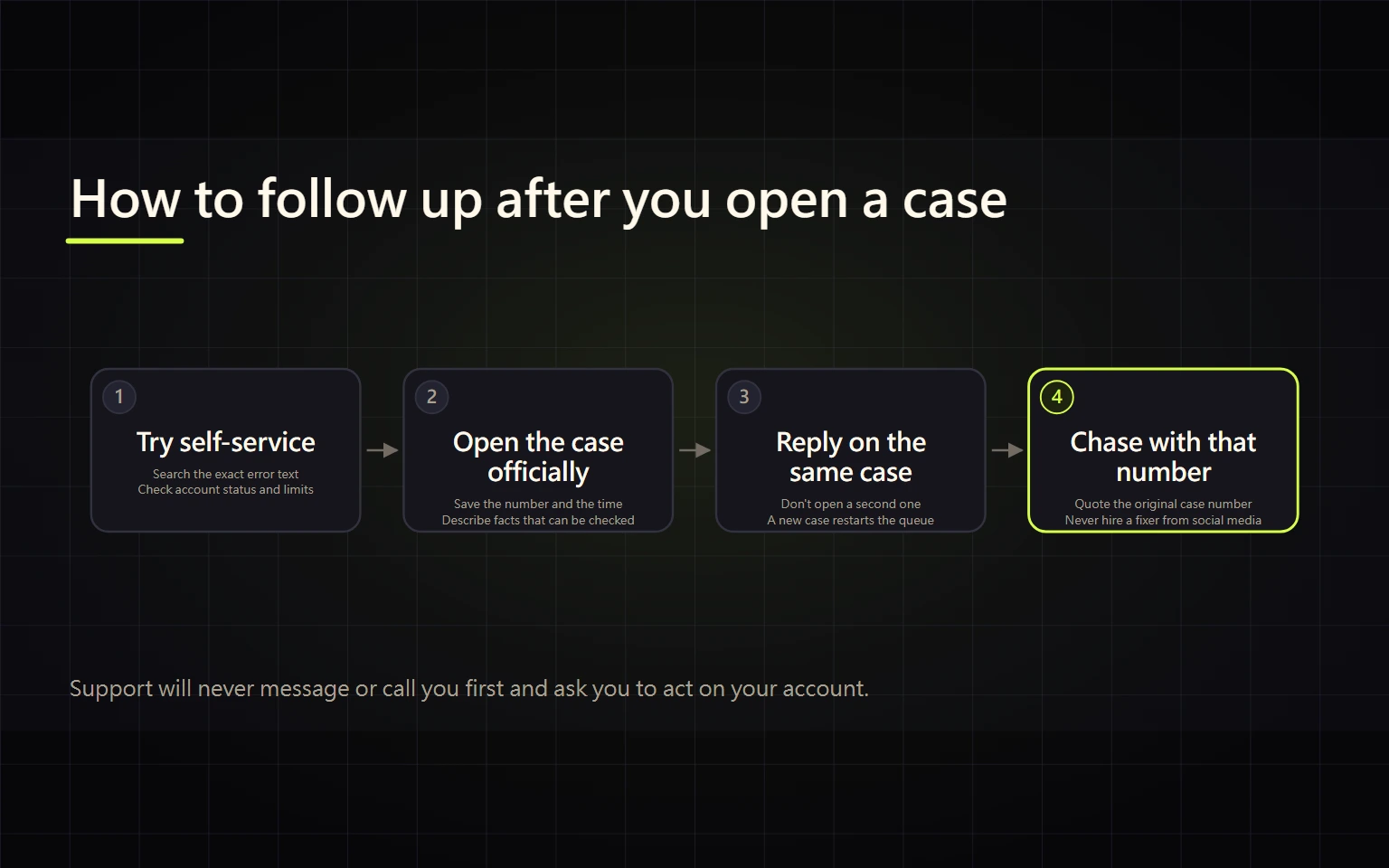
There is one official way to reach Binance support: log in, open the support icon at the bottom right of the website (or on the app home screen), go through the AI assistant first, and ask for a human agent if it can't solve the problem. After you submit, you can close the window, but you need to answer the agent within 24 hours or you lose your place in the queue. Follow up inside the same conversation instead of opening a new one. A formal complaint is a separate step for when support has answered and you disagree with the outcome; Binance says it will acknowledge a complaint in writing within two business days and give you a reference number.
This guide is for someone with one specific problem (a missing deposit, a stuck withdrawal, an account restriction, an odd order) who has already done a first round of checks. If you haven't worked out which kind of problem you have yet, start with troubleshooting missing deposits, failed orders, and fake support.
Pick the right route: self-service, live agent, or formal complaint
| Your situation | Route | Why |
|---|---|---|
| Resetting 2FA, updating identity details, checking a deposit | Self-service tools inside the support window | These are built as form flows; submitting directly is faster than waiting for an agent |
| No self-service tool fits and someone needs to look at your records | Transfer to a live agent | An agent has to review your account or transaction |
| Support has handled it, but you disagree with the result or how it was handled | Formal complaint | You get a written acknowledgement, a reference number, and response deadlines |
A common mix-up is treating "not finished yet" as grounds for a complaint. A complaint is about being dissatisfied with a service or outcome. While a case is still open, chase it in the original conversation.
How to get from the support window to a human
Based on Binance's help page "How to Use Binance Support?" (updated June 11, 2026):
- Log in. On the website, click the support icon at the bottom right. In the app, tap the support icon on the home screen.
- The window shows suggested questions, hot topics, and self-service tools. Scan the hot topics first: if a specific coin's withdrawals are paused, the answer is often a maintenance announcement.
- If nothing fits, click "Get Support" and pick a suggested topic or type your own question.
- If the AI's answer is wrong, tap "Unresolved", then "Not relevant". You'll then get the option to connect with a customer service agent.
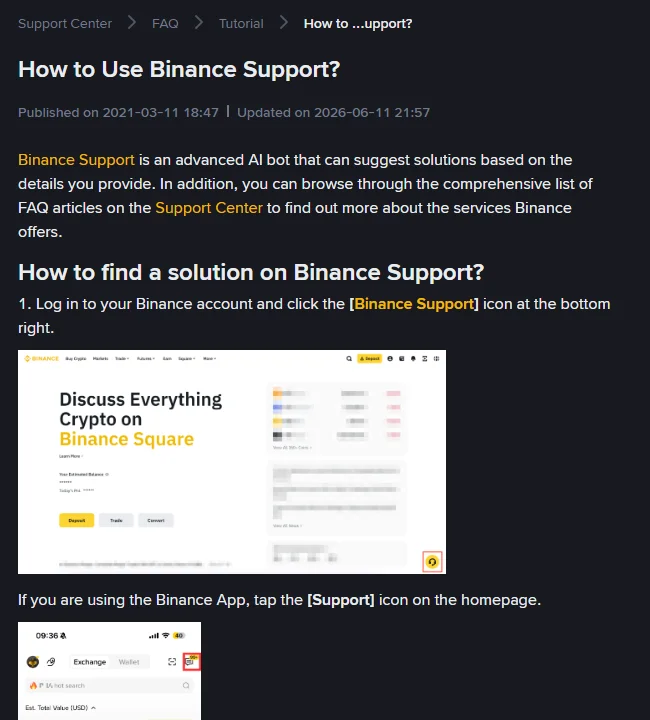
This is the official help page. Its example screenshots mark the support icon at the bottom right of the website and on the app home screen. Don't enter support through a search ad, a social media post, or a link someone messaged you. Type binance.com yourself and open the icon from there.
What to put in your first message
Once an agent picks up the case, most of the waiting comes from back-and-forth requests for details. Give all of this in the first message:
- One issue per conversation. A missing deposit and an account restriction are two cases.
- Record IDs: order ID, deposit or withdrawal TxID, P2P order number, and any code shown with the error.
- Time with time zone: write "2026-10-01 14:20 UTC+8", not "this afternoon".
- The exact wording you saw. Copy the error message; don't paraphrase it as "the system broke". You can check what a code means in which error codes are safe to retry.
- What you've already checked, e.g. "the block explorer shows Success and I selected the correct network", so you aren't asked to redo it.
- What you want: the funds credited, the restriction lifted, or just an explanation.
Before taking screenshots, redact personal details you don't need to share: full email, phone number, bank account number, home address. If the agent needs something specific, they'll ask for it in the chat.
Following up after you submit
The help page lists three rules that directly affect how long you wait:
- You can leave the window. You'll get a notification when the case is assigned to an agent.
- Reply within 24 hours of an agent's message, or you lose your place in the queue.
- You can reopen a closed conversation by replying to it. When you have more information or the problem comes back, reply to the original thread so the history stays in one place.
The page also says the team will reply as soon as possible but may not be able to reply in your preferred language. Getting an answer in English when you wrote in another language is normal and is not by itself a sign of an impostor.
If your case involves a withdrawal and support tells you it's "under review" or that the account is restricted, use how to tell a withdrawal cooldown, a risk review, and coin maintenance apart to decide whether to wait or send documents.
Not happy with the outcome: formal complaint deadlines
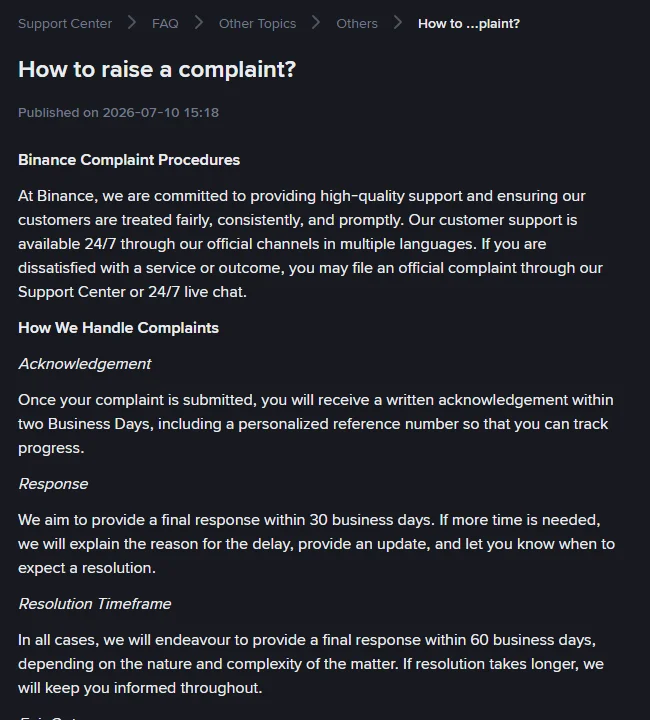
Binance's "How to raise a complaint?" page (published July 10, 2026) sets out this process:
- File the complaint through the Support Center or 24/7 live chat.
- You get a written acknowledgement within two business days, with a personal reference number for tracking.
- Binance aims to give a final response within 30 business days. If it needs longer, it will explain why and tell you when to expect a resolution.
- In all cases it will try to give a final response within 60 business days.
When you file, say clearly "I want to raise a formal complaint" and include the date or ID of the original support case, so it's handled as a complaint rather than another general question. Keep the reference number and quote it every time you follow up.
The same page says that once you've gone through Binance's internal process, you may escalate to the Financial Services Regulatory Authority (FSRA) of Abu Dhabi Global Market. This only covers complaints already raised with Binance about events on or after January 5, 2026. Whether it applies to you depends on which Binance entity serves your account and where you live, so check the official page and your user agreement.
Checking whether "support" is really Binance
Real support happens inside the support window you opened yourself. A "support agent" who messages you first, asks you to move to Telegram or WhatsApp, or wants you to send crypto to "verify your account" fits the usual impersonation pattern.
- Check a website, email address, phone number, or Telegram account with the official Binance Verify tool. That page states that Binance will never request funds or tokens through private communications.
- A verified result only confirms identity. It doesn't mean whatever that account is asking you to do is authorized.
- Nobody needs your password, 2FA code, or SMS code.
If someone says you must pay a tax or "unlock fee" before you can withdraw, read how to spot crypto withdrawal fee scams.
When is the case actually closed?
- Support gives a clear conclusion in the original conversation (credited, restriction lifted, or a specific document you need to provide), and you can see the matching change in your account.
- For a formal complaint, you receive a written final response with your reference number that addresses each point you raised.
If the official deadline passes with no answer, follow up in the original conversation or under your complaint reference, quoting the deadline and the number. Don't open several new chats at once, and don't pay any third party that claims it can "speed up" your case or "recover" your assets.
This is a general guide to using support. It doesn't guarantee any outcome or processing time. The current Binance Help Center pages and the terms that apply to your account take precedence.