
Account & Security
Binance Beginner Roadmap: Account Setup to First Spot Trade
Follow a verifiable sequence for regional checks, account security, a small deposit, the first spot trade, and a test withdrawal.
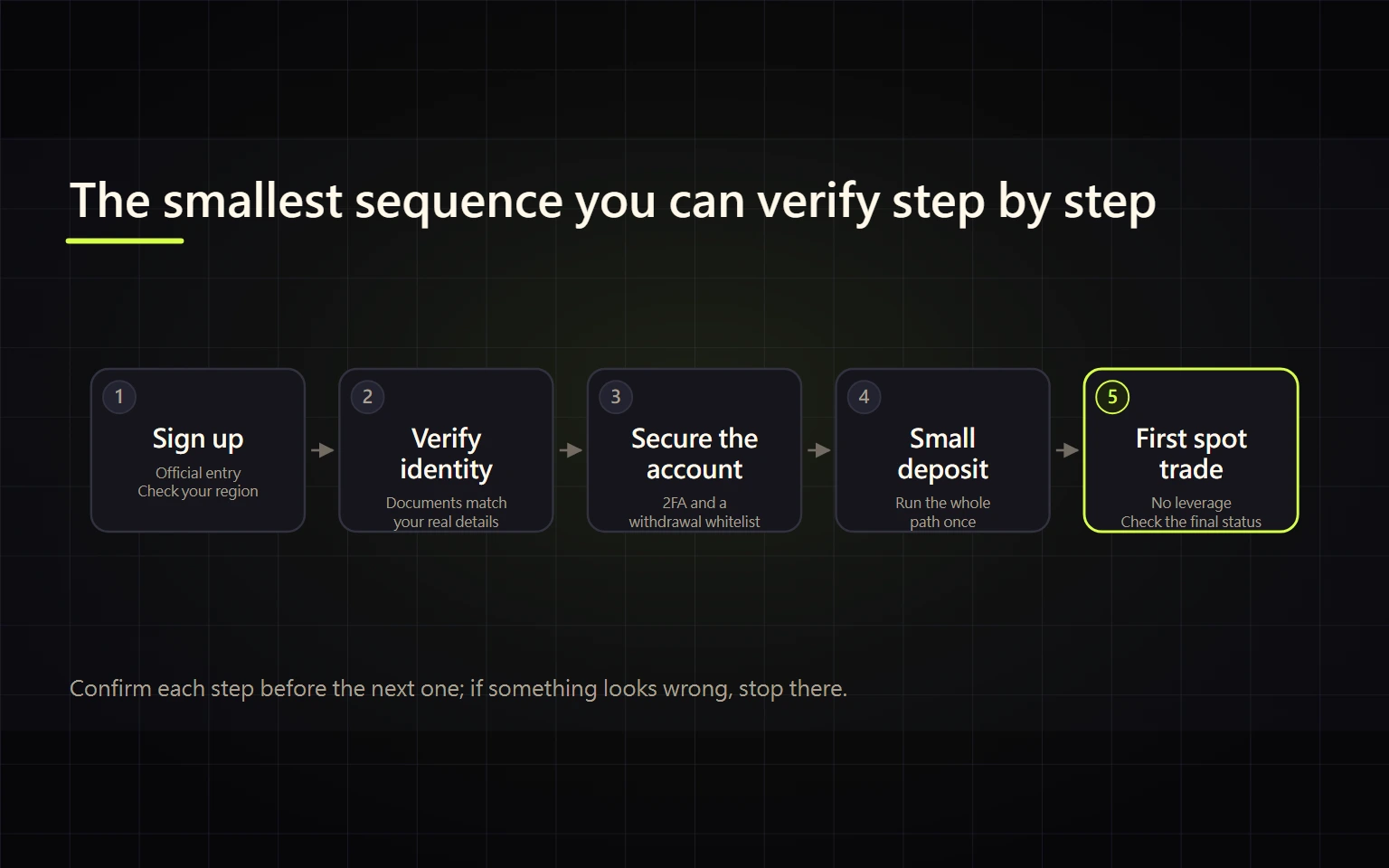
The safest way to learn Binance is not to explore every product. It is to complete one small, verifiable loop: confirm the correct regional platform, secure the account, fund it with a test amount, make one non-leveraged trade, and test a withdrawal. This guide is for a first-time centralized-exchange user who wants to know what to do next and how to tell whether each step is actually complete.
Verified on 2026-08-26 using the public desktop website. Labels, payment rails, identity checks, and product availability can differ by country, account, and app version. Use the options shown in your own account and your local terms. Do not use technical workarounds to bypass regional restrictions.
Table of contents
- Check three things before you start
- Stage 1: create and secure the account
- Stage 2: choose one small funding route
- Stage 3: locate the funds
- Stage 4: complete the first trade
- Stage 5: test a withdrawal
- Know when to stop
- Completion checklist
Check three things before you start
- Regional platform: enter through an official Binance domain and deal with any prompt that directs you to a locally regulated platform. A feature shown in someone else's tutorial may not be available to your account.
- Loss boundary: set a learning amount whose delay or price movement would not affect essential expenses. Do not borrow, use emergency funds, or enable leverage merely to follow a tutorial.
- Device and email: use a trusted device and network. Protect the registration email with a unique password and multi-factor authentication.
Opening Binance while logged out can produce a prompt directing you to the appropriate regional platform. That prompt is why this roadmap begins with jurisdiction and account availability, not with a universal sequence of buttons.
Pass condition: you know which regional platform you are using, which relevant services your account actually displays, and the maximum amount for this learning exercise. Stop if the page and your residence do not match or the applicable terms are unclear.
Stage 1: create and secure the account
Complete these tasks in order:
- Register from the official page. Before submitting, confirm the domain, regional platform, and any referral details shown on the form. Use the registration and referral-code checklist.
- Complete the identity checks required by your account. Your name, date of birth, document, and residence details should match valid records. Never give identity images to an unofficial “verification agent.”
- Set a unique password and preferably add a passkey or authenticator-based 2FA. Store recovery material separately from the device used to log in.
- Set an anti-phishing code if available, review authorized devices and account activity, and secure the email account before depositing.
Pass condition: the identity page explicitly shows verification completed or approved; you can sign in from a trusted device; a strong non-SMS factor is available; the email account is protected; and no device or activity is unfamiliar. Uploading a document or waiting for review is not completed verification. Resolve identity or access problems before funding the account.
Stage 2: choose one small funding route
Choose only one route based on where the money is now:
| Starting point | Route to evaluate | Verify before confirming | Evidence of completion |
|---|---|---|---|
| Fiat in your bank account | Bank deposit, card, or P2P comparison | Regional availability, beneficiary details, total cost, name requirements | Fiat balance or order status says completed |
| Debit or credit card | Card purchase | Payment currency, quote, crypto received, platform and issuer charges | Purchase order is completed and the asset is credited |
| Crypto in another wallet or exchange | On-chain deposit | Asset, network, full address, and memo/tag all match | Binance deposit history reaches the required confirmations and credits the asset |
| Purchase from another user | P2P | Counterparty data, limits, terms, and an in-order payment method | The asset is released in the order, not merely shown in a payment screenshot |
Use a test amount first. For an on-chain deposit, compare the full destination address before sending. For a fiat or P2P route, use only the instructions shown inside the official order and allowed by local rules.
Pass condition: the order or deposit record has a completed state, the credited amount matches the evidence, and you have saved the order ID or transaction ID. A bank debit, payment screenshot, or “submitted” state at the sender is not proof that Binance credited the deposit.
Stage 3: locate the funds
“Total balance” does not mean every asset is immediately available for a spot order. Depending on the funding route, an asset may be in the Spot Wallet, Funding Wallet, or another product balance.
- Open the asset overview and find the exact asset and credited quantity.
- Check which wallet holds it. If a spot order needs it, use Binance's internal Transfer function to move it to the Spot Wallet.
- Before transferring, confirm the source wallet, destination wallet, asset, and amount. An internal transfer is not an on-chain withdrawal and does not require an external address.
Pass condition: you can find the credit in account history and explain why it sits in that wallet. If the balance appears missing, check deposit history and wallet location before sending another deposit.
Stage 4: complete the first trade
Use spot only—no borrowing or leverage. Decide what you are spending and what you are acquiring, such as using USDT to buy a small amount of BTC.
- Use Convert when you want a simpler quote-based exchange. Record the input, quote expiry, and expected output before accepting.
- Use Spot when you need order-price control. Learn the pair, order book, order form, open orders, and trade history before submitting.
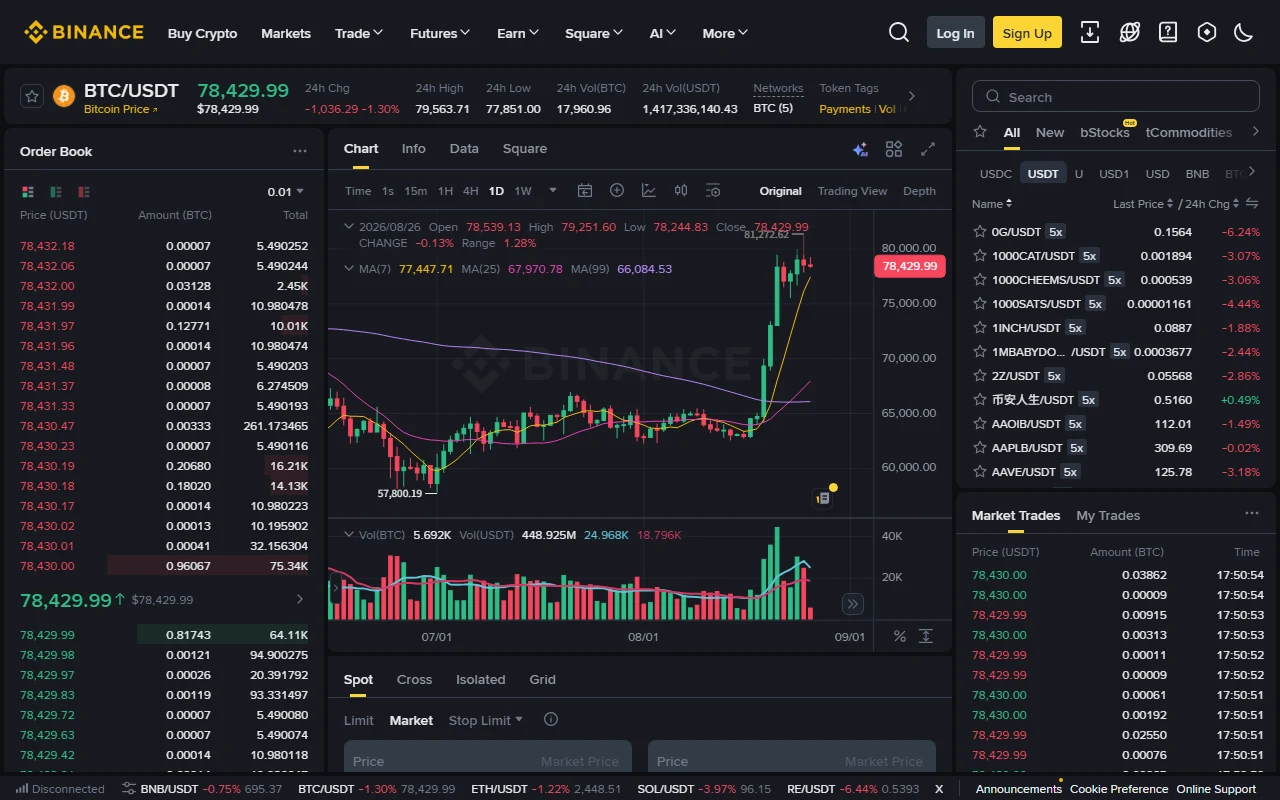
The image is the real public BTC/USDT spot interface. The pair means BTC is the base asset and USDT is the quote asset. A market order prioritizes execution but not a guaranteed average price. A limit order controls the acceptable price but can remain open, partially fill, or never fill.
Before submission, write down the pair, side, order type, and intended quantity. Afterward, use trade history—not the chart—to verify the actual fill price, quantity, and commission. The Binance fee, spread, and slippage guide explains how to calculate effective cost.
Pass condition: trade history shows a fill, and you can state what was acquired, what was spent, the filled quantity, and the fee. A limit order that remains under Open Orders is not complete.
Stage 5: test a withdrawal
Only attempt an on-chain withdrawal when you control, or have verified, a destination that supports the same asset and network.
- At the receiving service, confirm the asset, network, and whether a memo or tag is required.
- On Binance, select the same asset and network. Paste and compare the complete address. If address whitelisting is enabled, finish that verification first.
- Review the fee and estimated receipt, then send a test amount.
- Once Binance supplies a TxID, check it on the correct network's block explorer. Wait for the receiving service to credit it before considering a larger transfer.
For a fiat cash-out, use the bank withdrawal versus P2P cash-out guide. Selling an asset into USDT is not the same event as money becoming available in a bank account.
Pass condition: the withdrawal history and TxID are traceable, and the destination shows the correct asset and amount. Do not submit a duplicate while the original is only submitted or processing.
Know when to stop
Stop transferring or placing orders if any of these conditions appears:
- the site directs you to a regional platform or your account lacks the tutorial's feature;
- the domain, app source, or support identity cannot be verified through an official channel;
- anyone requests a password, 2FA code, SMS code, cookie, API secret, seed phrase, or remote-control access;
- a person demands another payment to “unlock” a deposit, reward, or risk review;
- the address, network, or memo/tag cannot be verified;
- an order or withdrawal state is unclear and you are about to resubmit it.
Save the order ID, TxID, state, timestamp, and a redacted screenshot, then follow the Binance troubleshooting and scam-safety guide before contacting official support. Never post complete transaction or account screenshots in a public group.
Completion checklist
The beginner loop is complete only when all of these statements are true:
- the regional platform and available account features are confirmed;
- identity and security tasks are complete, with no unfamiliar device or activity;
- one small deposit has verifiable completion evidence;
- you know whether the asset is in Funding or Spot;
- one Convert or spot order has filled and you can explain its fee;
- one small withdrawal is verifiable at Binance and the destination;
- order, deposit, withdrawal, and locally required tax records have been saved.
Do not treat derivatives, margin, loans, copy trading, or other advanced products as part of this checklist. Repeat the basic loop until you can verify pairs, networks, addresses, fees, and states without relying on somebody else's screenshot.
Official sources
- Binance Beginner's Guide
- Guide to Binance deposits and withdrawals
- Guide to Binance Spot trading
- Binance risk warning
Risk notice: crypto assets are volatile, and blockchain transfers are generally irreversible. This article is general education, not investment, legal, or tax advice. Confirm fees, restrictions, and product availability on the official page at the time of action.